
Gamdom Login Canada: Sign In Safely on Any Device
Signing in to Gamdom takes seconds once you know where to click. Below: the exact steps on desktop and mobile, what to do when the login fails, and the security settings worth switching on today.
This site never collects usernames or passwords.
How to log in to Gamdom
The same four steps work on Windows, macOS and Chromebooks. Bookmark the official site after your first visit so you never have to search for it again.
Open Gamdom
Use our Visit Gamdom button or type gamdom.com directly into the address bar.
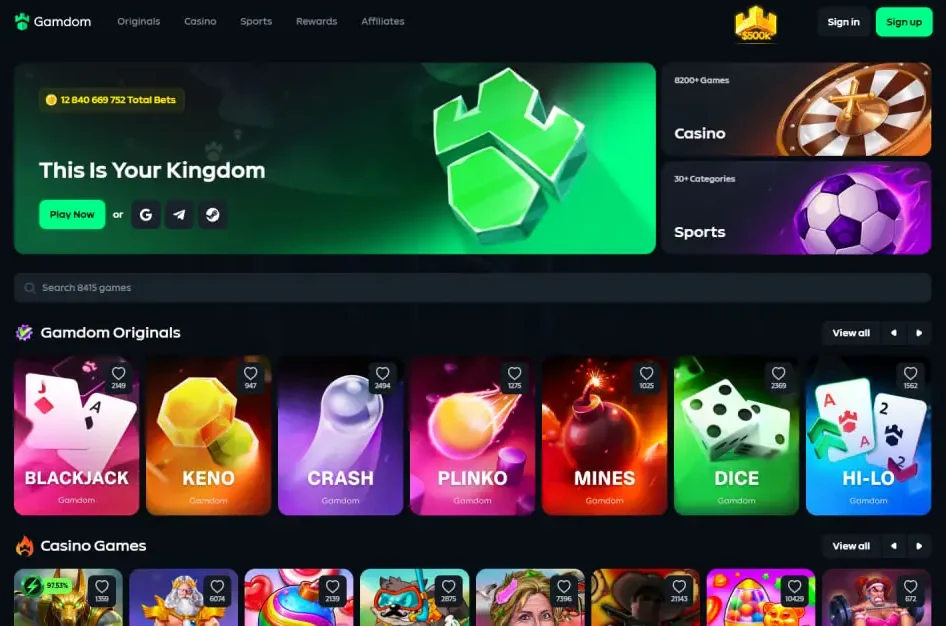
Find Sign in
It is in the top-right corner, to the left of the green Sign up button.
Choose your method
Email or username with password, or Google, Telegram or Steam if that is how you registered.
Confirm 2FA
If two-factor authentication is on, enter the six-digit code from your authenticator app.
Signing in on iPhone and Android
Open gamdom.com in Safari or Chrome. The header shrinks to a logo, a Sign in button and a menu icon, so the login is always one tap away.
- Save a shortcut: in Safari use Share → Add to Home Screen; in Chrome use the menu → Add to Home screen.
- Use your password manager: iCloud Keychain and Google Password Manager both fill Gamdom credentials securely.
- Keep the app code handy: if you use 2FA, your authenticator should be on the same phone or another device you carry.
New to Gamdom?
You need an account before you can log in. Register with our referral code and your first 7 days include 15% rakeback.
Gamdom login not working?
Work through the table from the top. Most sign-in problems are solved by the first three rows.
| Symptom | Likely cause | What to do |
|---|---|---|
| "Invalid credentials" | Typo, caps lock, or old password | Retype carefully or use Forgot password to set a new one. |
| Account not found | You registered with Google, Telegram or Steam | Choose the same social button you used when signing up. |
| 2FA code rejected | Phone clock out of sync | Turn on automatic date and time on your phone, then try a fresh code. |
| Page will not load | Browser cache, extensions or network filter | Try a private window, disable ad blockers for the site, or switch from Wi-Fi to mobile data. |
| Access restricted message | Your location is not supported | Check Gamdom's terms for restricted regions. Do not try to bypass location checks; it can lead to account closure. |
| Account locked or suspended | Security review or self-exclusion | Contact Gamdom support through live chat or email from the official site. |
Six habits that protect your Gamdom balance
Turn on 2FA
An authenticator app adds a second lock that a leaked password alone cannot open.
Unique password
Never reuse your email or banking password. A manager can generate and store a long one.
Check the address
Look for gamdom.com in the address bar. Fake login pages copy the design but not the domain.
Ignore "support" DMs
Staff will not ask for your password or 2FA code in chat, Discord or Telegram.
Log out on shared devices
Library, work or family computers should never keep you signed in.
Whitelist withdrawals
Where available, save trusted wallet addresses so funds can only leave to places you control.
On desktop it is the Sign in button in the top-right corner, next to the green Sign up button. On mobile it sits in the same spot of the compact header.
Yes, if you created the account that way. The sign-in window offers Google, Telegram and Steam alongside the username or email and password option. Use the same method you chose at registration.
Open the sign-in window and use the Forgot password link. A reset email goes to the address on your account; check spam and promotions folders if it does not arrive within a few minutes.
The most common reasons are a wrong password, a login method that differs from the one you registered with, an expired 2FA code, or a location that Gamdom restricts. Ontario, for example, has a separate regulated market. Contact Gamdom support if your details are right and the problem persists.
Only use links you trust, and always check that the address bar shows gamdom.com before typing a password. This guide never asks for your login details; all sign-in happens on Gamdom itself.
Sign in once in Safari or Chrome and add the site to your home screen. Your session stays active until you log out or the session expires for security reasons.
Head to the official Gamdom sign-in
Open Gamdom in a new tab, press Sign in and pick up where you left off.